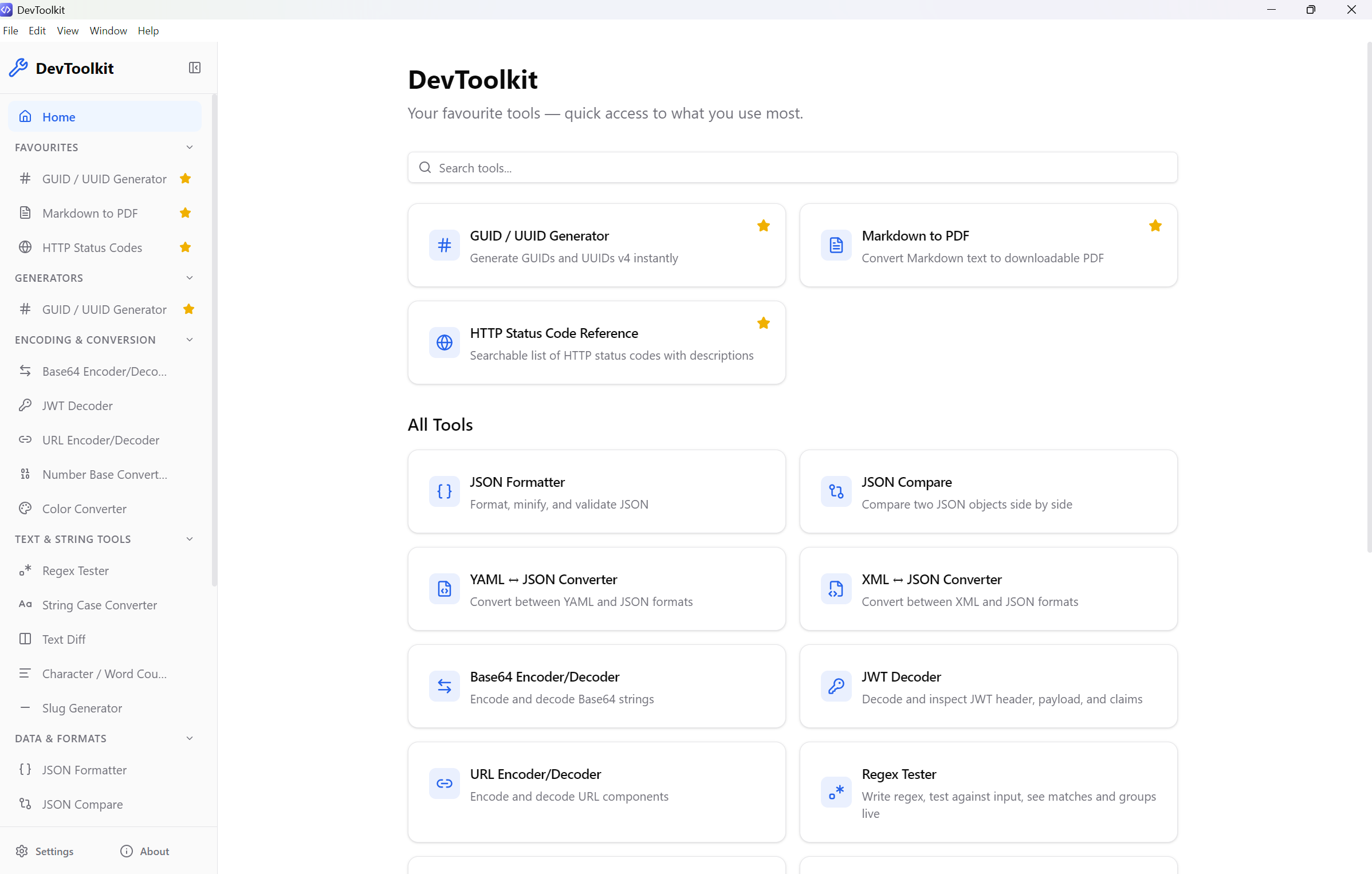
DevToolkit
21 essential developer utilities in one beautiful desktop app — completely offline, open-source, and privacy-first. No accounts. No data leaves your machine.
Your Tools. Your Machine. Your Data.
Every developer has a collection of browser bookmarks for small utility tasks — a JSON formatter here, a Base64 decoder there, a JWT inspector on yet another tab. These tools are scattered across dozens of websites, each with their own quirks: some inject ads, some require sign-ups, and almost all of them process your data on a remote server.
DevToolkit puts an end to that. It bundles 21 essential developer utilities into a single, beautiful desktop application that runs entirely on your machine. No internet connection needed. No accounts. Every byte of data you paste into DevToolkit stays on your local filesystem.
🔒 Privacy as a Feature, Not a Marketing Line
This isn’t a tool that “respects your privacy” while silently phoning home. DevToolkit makes zero network requests. The Electron app loads from local files. There is no update check, no crash reporter, no analytics SDK. Audit the source code yourself — it’s all open.
This makes DevToolkit ideal for:
- Working with production data — Decode that JWT from prod without worrying about where it ends up
- Air-gapped environments — Works on machines with no internet access
- Security-conscious teams — No third-party data processing, ever
- Regulated industries — Keep sensitive data processing strictly local
🛠️ The Complete Toolkit
Generators
- UUID/GUID Generator — Generate v4 UUIDs with one-click copy
Encoding & Conversion
- Base64 Encoder/Decoder — Encode and decode Base64 strings
- URL Encoder/Decoder — Encode/decode URL components
- JWT Decoder — Inspect JWT headers, payloads, and expiry instantly
- Number Base Converter — Decimal ↔ Hex ↔ Octal ↔ Binary in real time
- Color Converter — HEX ↔ RGB ↔ HSL with a live visual color picker
Text & String Tools
- Regex Tester — Write regex, test live, see matches and capture groups
- String Case Converter — camelCase, snake_case, PascalCase, kebab-case, CONSTANT_CASE, Title Case, dot.case
- Text Diff — Side-by-side or inline diff with line, word, and character modes
- Character/Word Counter — Chars, words, lines, sentences, paragraphs, and byte size
- Slug Generator — Turn any title into a URL-safe slug with configurable separators
Hashing & Crypto
- Hash Generator — Generate MD5, SHA-1, SHA-256, SHA-512 hashes from text
Data & Formats
- JSON Formatter — Format, minify, and validate JSON with syntax highlighting
- JSON Compare — Structured diff view of two JSON objects
- Markdown to PDF — Convert Markdown to a downloadable, styled PDF
- YAML ↔ JSON Converter — Bidirectional conversion with syntax validation
- XML ↔ JSON Converter — Bidirectional XML and JSON conversion
- Cron Expression Parser — Plain English cron descriptions, next run times, and presets
Date & Time
- Unix Timestamp Converter — Epoch ↔ human-readable with a live clock
Network & API
- HTTP Status Code Reference — Searchable, categorized reference for all HTTP status codes
- CIDR/Subnet Calculator — Network range, broadcast, usable hosts from CIDR notation
⚡ Designed for Developer Workflows
Dark Mode
DevToolkit has full support for dark mode, which is enabled by default. The interface uses semantic design tokens for a consistent, polished experience across all 21 tools. Light mode is a toggle away for those who prefer it.
Favourites & Quick Search
Pin your most-used tools to the top of the sidebar for one-click access. Use the home screen search bar to find any tool instantly. Your favourites persist across sessions in a local SQLite database.
Consistent UX Patterns
Every tool follows the same interaction pattern: input on the left, output on the right, with clear and copy buttons in consistent positions. If you know how to use one tool, you know how to use all of them.
Sample Data Pre-loaded
Every tool launches with sample data so you can see exactly how it works before pasting in your own input. Every output has a copy button for instant clipboard access.
🏗️ Built With Modern Tech
DevToolkit is built on a modern, proven stack:
- Electron — Cross-platform desktop runtime (Windows, macOS, Linux)
- React 18 — Component-based, reactive UI
- TypeScript — End-to-end type safety
- Tailwind CSS v4 — Utility-first styling with custom theme tokens
- Vite — Sub-second hot reload in development
- SQLite — Local storage for favourites and preferences
🚀 Get Started
Download
DevToolkit is available for Windows, macOS, and Linux.
Build from Source
git clone https://github.com/AseemGaurav/DevToolkit.git
cd DevToolkit
yarn install
yarn dev
🤝 Open Source & MIT Licensed
DevToolkit is released under the MIT license. Use it at work, at home, on any machine. Fork it, extend it, contribute to it — PRs are welcome for new tools, bug fixes, and improvements.
What’s Coming Next
We’re already planning more tools:
- Lorem Ipsum Generator — Configurable placeholder text
- QR Code Generator — Create QR codes offline
- JSON Schema Validator — Validate JSON against schemas
- SQL Formatter — Pretty-print SQL queries
- CSV ↔ JSON Converter — Tabular data conversion
Have an idea? Open an issue on GitHub — we genuinely want to hear what tools you wish existed.