ItDependsOn
Visualize .NET project dependencies as an interactive graph — right inside VS Code. Instantly see how your projects, packages, and references connect across your entire solution.
See Your Dependencies. Understand Your Architecture.
Every .NET solution grows. What starts as a clean three-project structure quietly evolves into a web of cross-references, shared libraries, and NuGet packages. You know the dependencies are there — but can you see them?
ItDependsOn makes the invisible visible. It parses your .NET project files and renders an interactive dependency graph directly inside VS Code. No configuration. No external tools. Just right-click and visualize.
🎯 Why ItDependsOn?
The Problem
.NET solutions can grow to dozens — sometimes hundreds — of projects. Understanding how they depend on each other means manually reading .csproj files, tracing <ProjectReference> elements, and holding a mental model of the entire dependency tree. That mental model breaks down fast.
The Solution
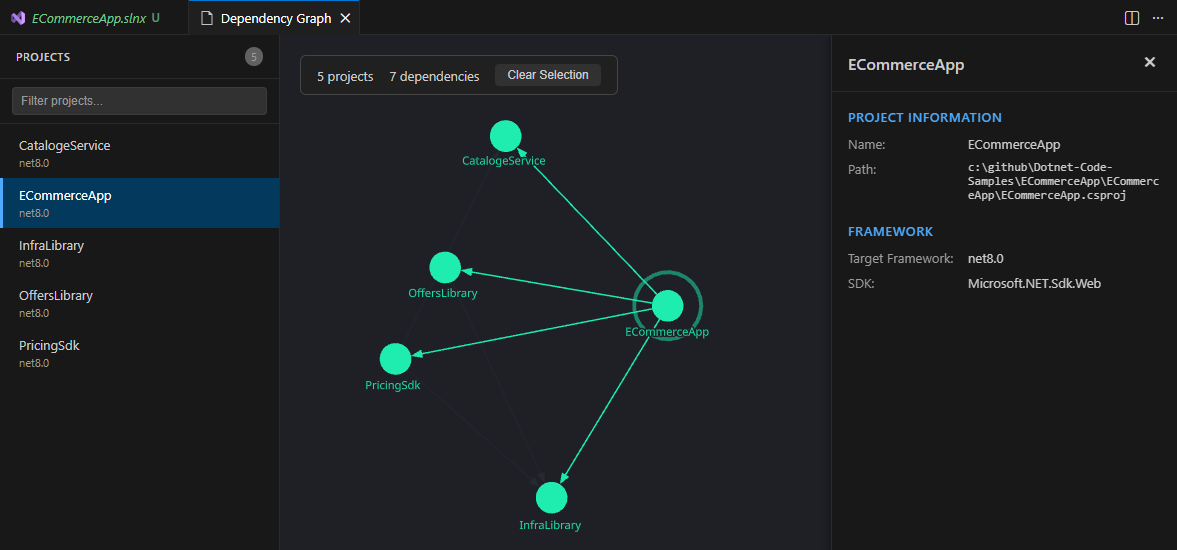
ItDependsOn parses your solution and project files, extracts all project-to-project references and NuGet package dependencies, and renders them as a live, interactive graph in a VS Code webview panel. Nodes represent projects and packages. Edges represent dependencies. The graph is zoomable, pannable, and draggable — making it easy to explore even the most complex solutions.
⚡ How It Works
- Open any folder containing
.slnor.csprojfiles in VS Code - Right-click a solution or project file in the Explorer → “Visualize Dependencies”
- Explore the interactive dependency graph in a dedicated panel
That’s it. No configuration files. No setup wizards. No CLI tools to install. ItDependsOn reads your project files directly and builds the graph on the fly.
You can also launch it from the Command Palette (Ctrl+Shift+P) → “ItDependsOn: Visualize Dependencies”.
🔍 What It Visualizes
Project References
Every <ProjectReference> in your .csproj files becomes an edge in the graph. See at a glance which projects depend on which, and trace transitive dependency chains visually.
NuGet Packages
<PackageReference> elements are extracted and displayed as package nodes. Quickly identify shared dependencies, version conflicts, and packages that are pulled in by multiple projects.
Solution Structure
When launched from a .sln file, ItDependsOn parses the entire solution and visualizes all projects and their interconnections in a single graph.
🖱️ Interactive Graph Features
The dependency graph isn’t a static image — it’s a fully interactive visualization powered by reagraph:
- Zoom & Pan — Scroll to zoom, drag to pan. Navigate large graphs effortlessly
- Drag Nodes — Reposition nodes to create the layout that makes sense to you
- Hover Highlights — Hover over a node to highlight its direct dependencies
- Force-Directed Layout — The graph automatically arranges itself using physics-based simulation
- Responsive — The graph panel resizes with your VS Code layout
🏗️ Built With
| Technology | Purpose |
|---|---|
| TypeScript | Extension and webview logic |
| React | Webview UI components |
| reagraph | Interactive graph rendering with WebGL |
| fast-xml-parser | High-performance .NET project file parsing |
| VS Code Webview API | Native VS Code panel integration |
🚀 Install
From the VS Code Marketplace
Search for “ItDependsOn” in the VS Code Extensions panel (Ctrl+Shift+X), or:
Install from VS Code Marketplace →
From VSIX
Download the latest .vsix from GitHub Releases and install manually:
code --install-extension itdependson-dotnet-0.0.1.vsixOr in VS Code: Extensions → ... menu → “Install from VSIX…”
Build from Source
git clone https://github.com/cottonstartiet/it-depends-on.git
cd vscode-itdependson-dotnet
yarn install
cd webview && yarn install && cd ..
yarn compile
🤝 Open Source & MIT Licensed
ItDependsOn is released under the MIT license. Use it, fork it, extend it — contributions are welcome.
What’s Coming Next
We’re actively developing ItDependsOn with more features planned:
- Dependency depth filtering — Show only N levels deep from a selected project
- Circular dependency detection — Highlight cycles in your dependency graph
- Export to PNG/SVG — Save your dependency graph as an image
- NuGet version display — Show package versions on graph edges
- Search & highlight — Find a specific project or package and highlight its connections
Have an idea? Open an issue on GitHub — we’d love to hear from you.