Introducing ItDependsOn — Visualize .NET Dependencies in VS Code
We built a free, open-source VS Code extension that turns your .NET project dependencies into an interactive graph. Right-click a solution file, see every project reference and NuGet package — instantly.
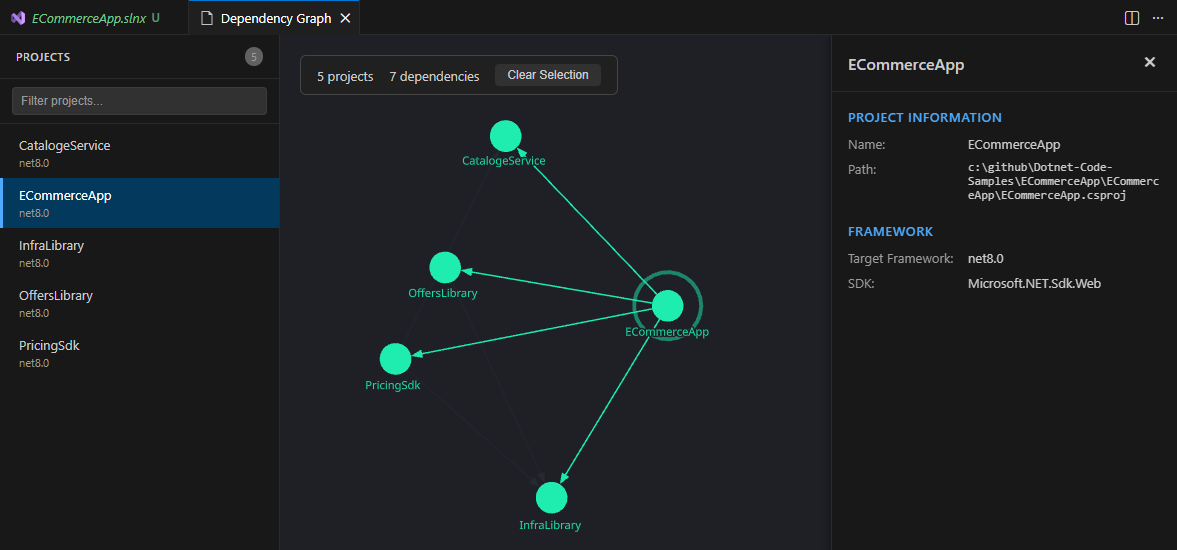
If you’ve ever worked on a .NET solution with more than a handful of projects, you know the feeling: somewhere in the back of your mind, there’s a vague map of which project depends on which. Maybe you drew it on a whiteboard once. Maybe it lives in a Confluence page from 2022 that nobody updates.
Today we’re releasing ItDependsOn — a VS Code extension that turns that mental model into a real, interactive graph.
What Is ItDependsOn?
ItDependsOn is a VS Code extension that parses your .sln and .csproj files, extracts all <ProjectReference> and <PackageReference> entries, and renders them as an interactive dependency graph directly inside VS Code.
No external tools. No configuration. No CLI. Just right-click a solution or project file in the Explorer panel, select “Visualize Dependencies”, and the graph appears in a dedicated webview panel.
Why We Built It
.NET solutions grow organically. A shared library here, a new microservice there, a “temporary” project reference that becomes permanent. Before long, you’re managing a dependency web that’s hard to reason about by reading XML.
We wanted a tool that would:
- Make dependencies visible — not buried in
.csprojXML, but rendered as a visual graph - Work inside VS Code — no context switching to external tools or web UIs
- Require zero setup — install the extension, right-click, done
- Be free and open source — MIT licensed, no accounts
ItDependsOn delivers on all four.
The Graph
The dependency graph is built with reagraph, a WebGL-powered React graph visualization library. It’s not a static image — it’s a fully interactive visualization:
- Zoom and pan to navigate large solution graphs
- Drag nodes to rearrange the layout manually
- Hover over any node to highlight its direct dependencies
- Force-directed layout automatically positions nodes using physics-based simulation
Projects and packages are rendered as distinct nodes. Dependencies are rendered as directed edges. The result is a clear, navigable picture of how your solution is wired together.
How to Use It
- Install ItDependsOn from the VS Code Marketplace
- Open a folder containing
.slnor.csprojfiles - Right-click a solution or project file → “Visualize Dependencies”
- Explore the graph in the webview panel
You can also launch it via the Command Palette: Ctrl+Shift+P → “ItDependsOn: Visualize Dependencies”.
What It Parses
ItDependsOn uses fast-xml-parser to read .csproj files directly. It extracts:
<ProjectReference>— project-to-project dependencies within the solution<PackageReference>— NuGet packages consumed by each project.slnfile structure — maps which projects belong to the solution
The parsing happens locally, in-process, with no external tools or SDK dependencies. If VS Code can read the file, ItDependsOn can parse it.
The Tech Stack
ItDependsOn is a hybrid VS Code extension: the extension host runs in Node.js (TypeScript), while the graph UI runs in a VS Code webview panel powered by React.
| Component | Technology |
|---|---|
| Extension host | TypeScript, VS Code Extension API |
| Webview UI | React, reagraph (WebGL) |
| Project parsing | fast-xml-parser |
| Build tooling | Vite, esbuild |
The extension weighs in at under 2 MB packaged, and the graph renders smoothly even for solutions with 50+ projects.
Open Source, MIT Licensed
ItDependsOn is free and open source under the MIT license. No accounts, no feature gates.
What’s Next
We’re already planning the next features:
- Dependency depth filtering — show only N levels from a selected project
- Circular dependency detection — highlight cycles automatically
- Export to image — save the graph as PNG or SVG
- NuGet version display — show package versions on edges
- Search and highlight — find and spotlight specific projects or packages
If you work with .NET solutions in VS Code, give ItDependsOn a try. Right-click, visualize, understand.